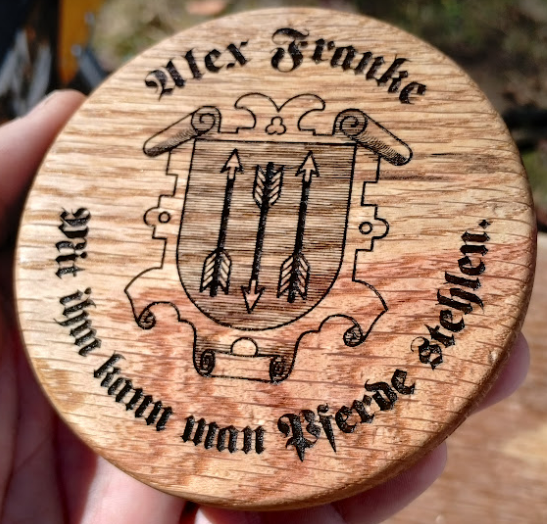
Here’s a video that explains how to use the custom branding irons to burn your brand on woodworking projects. The branding irons were originally described in A $6 Custom Branding Iron, and there is a tutorial at Making the $6 Branding Iron, Step-by-Step.
You are currently browsing articles tagged Woodworking.
Here’s a spice rack I made to fit on the back of a cabinet door. It really cleans up the spice cabinet, and makes the individual jars a lot easier to find. I had to notch the shelves out a bit in order to make it fit, and it’s built to fit spice jars from Penzeys, which are a pretty standard size.
It’s a little less fancy that the Poplar and Walnut Spice Rack that I made as a gift a few years ago because it’s not intended to be displayed out in the open. It was made almost entirely from recycled maple wainscoting.

The maple spice rack mounted on the back of a cabinet door
The shelves are fixed. The fronts are high enough that they will stop the jars from tipping over if the door is slammed, but not so high that they block the name of the spice. The shelves are spaced far enough apart that the jars can be removed by tipping them forward.

A detail view of one of the shelves
To add the band, I used the $7.40 branding iron that I described in the A $6 Custom Branding Iron post.

The brand on the side of the spice rack
In the A $6 Custom Branding Iron post, I showed off a branding iron I had “printed” in stainless steel by Shapeways.com for US$6, after using the free vector image editor Inkscape, and parametric modeling software Alibre Design, which also has a free version called Alibre Design Xpress.
This tutorial requires a working knowledge of Alibre Design (or other 3D parametric modeling software) and Inkscape (or other vector graphics editing software).

$6 branding iron
Here are the steps I took to make it happen: (I’ll add more detail over time.)
- Design in Inkscape
- Convert all text objects to paths (Path > Object to path)
- Convert all stroked lines to paths (Path > Stroke to path)
- Ungroup all objects
- Union all objects (Path > Union)
- Select object
- Save As… Type Desktop Cutting Plotter (R13) (*.dfx) – Output will be in mm
- Import into Alibre Design (File > Import, type DXF)
- Select mm for file units
- (It imports into a drawing)
- Select everything and Explode (Edit > Explode Symbol)
- Activate the sketch
- Analyze (Sketch > Analyze…)
- Heal all problems
- While activated, select the figures
- Copy to a Alibre Design Part
- Open a new part
- Activate a design plane and Paste (the figure may appear far from center)
- Select the curves, shift-left-click to drag to better location
- Model the branding iron
- Extrude sketch 1.25mm — this is the depth of the brand.
- Select *top* face and insert a plane. (right-click > Insert Plane…)
- Select the new plane, Project to Sketch (if necessary), to create a foundation for the brand.
- Extrude 2mm for foundation
- Insert another plane on the back of the foundation
- Extrude a mounting hole, 4.9mm is 0.1375mm larger than 3/16″
- Cut a set screw hole in an accessible location if necessary. 3.048mm is 0.12″, the tap size for #6-40 set screw.
- Export & Upload
- Export as *.STL file
- Upload to Shapeways.com
- Order in stainless steel
- Finish
- Tap the mounting flange for a 10-32 screw
- Thread a 3/8″ steel rod with 10-32 die or use a 10-32 screw
- Build a handle
- Sand down the surface of the branding iron to make it nice and flat
Some woodworkers like to leave their mark on their work using a branding iron, but at roughly $190 per iron, it can really be quite an investment. I took a less expensive route, using some free software, and a genius 3D printing serviceĀ called Shapeways.com.
I started by drawing up a couple of logo ideas in Inkscape, a free vector graphics application. I exported by design from Inkscape and imported it into Alibre Design, which is a fantastic parametric 3D modeling application that happens to be available for free in a feature-limited version. Once I was satisfied with the 3D model, I exported again, uploaded the file to Shapeways, and “printed” it in stainless steel. The total cost for the “AF” design was $6, and only $7.40 for the larger name logo.
I tapped the back of the iron and threaded a short section of 3/16″ steel rod, and inserted it into a little handle that I turned out of some scrap cherry. After a couple of test burns, I was pretty happy with the result. Next I’ll try sanding it down a bit to see if I can make it even cleaner.
Update: I’ve added a step-by-step tutorial on how I made these: Making the $6 Branding Iron, Step-by-Step. There’s also a video on how to use it here: Using the Custom Branding Irons.
- $6 branding iron
Here’s a Scalable Vector Graphics (SVG) drawing of a 24-tooth saw blade. I needed a simple circular saw blade clipart image for a logo I’m working on, but I couldn’t find a usable one online so I created my own.
Enjoy!
I picked up several of these scoop kits at Rockler a couple weeks ago to use as Christmas gifts. I used bubinga and sugar maple, and finished it with tung oil. This handle feels the best so far — both forehand and backhand — so I think this one might stay with me!
Here’s a great little online app that will test how good you are at “eyeballing” different measurements. Drag a point or line around to make simple geometric figures. After eyeballing seven different ones three times each, you’ll get a score and a chart that compares you against other test-takers.
Very cool. Check it out here: http://woodgears.ca/eyeball/
Every time I opened our entry closet I wanted to scream. I’ve been wanting to re-do it for a long time, and I finally bit the bullet and did it.
Coats, which we accessed most, were often pushed back in the cubbies behind the walls, and the rickety wire shelving in the middle held a bunch of stuff that we hardly ever accessed. So I moved the shelves to the sides, and the hanger rods in the middle. If we need extra hanging space now, we can just take out a couple shelves.
Next comes some paint, a shoe rack, and an umbrella holder. Plus I want to wire up an LED light “fixture” to a reed switch so that the lights come on when you open it up. We’ll see how that one goes…
Before and after: (Click for larger views.)
We wanted a table with a drawer in a little nook for our entryway. I just have some finish sanding to do and then finish, but it’s pretty much assembled (except for the hardware). I should have sharpened my chisels before trying the dovetails — they’re very rough, but it gives them charm, I think. Except for the table top, it’s all recycled maple.
Click for larger images.
Here’s a table extension I put together last night for the Freud Avanti Plunge Router that’s gotten a lot of press over the past few days. It’s made with some MDF, some scrap 1/2″ maple, 3/4″ oak, and 1/2″ plywood.
From the top, you can access the clamp, height adjustment, and spindle lock. The sides of the table were made from a 1/2″ piece of scrap maple wainscoting, cut in half (one half for each side). The hole on the far left was already there in the scrap piece, so it’s not used here. There are a couple of scrap pieces of oak to support the 3/4″ MDF top. Until I get the right length bolts, I just used a nut to tighten them down. I have a magnetic tray here that holds the adjustment know and wrench — it collects a lot of sawdust from the router, but it’s the only place it really fits.
I never even untied the router cord — tt hangs nicely on the hook I use for the saw fence. When I want to plug it in, I use the table saw outlet and the table saw switch. Remember to turn the router back off if you do this!!!
The insert is 1/2″ plywood. In one of the pictures, you’ll notice that I had to carve a little notch in one of the supports so the locking lever would swing freely. Oops!
The extension is mounted with T-nuts and slides out, and drops down for storage. (I guess that what this is useful for, but I pretty much have it up all the time.) The screws that join it all together are countersunk and basically just fasten the sides to the table and the oak supports.
Click for larger views.